What you’ll do in Stohb
- Find the sale and its reference.
- Check items, customer and payments together.
- Keep the fulfilment handoff clear.
Follow the screens using your own business details. The screenshots were captured in the actual Stohb apps with local guide examples. Prices, customers and results shown are illustrative.
Follow an order through Stohb Central
Keep the customer’s agreement and delivery details ready. The local example is a ₦100,000 sale for 10 Guide linen shirts.
1. Add the correct item to a sale
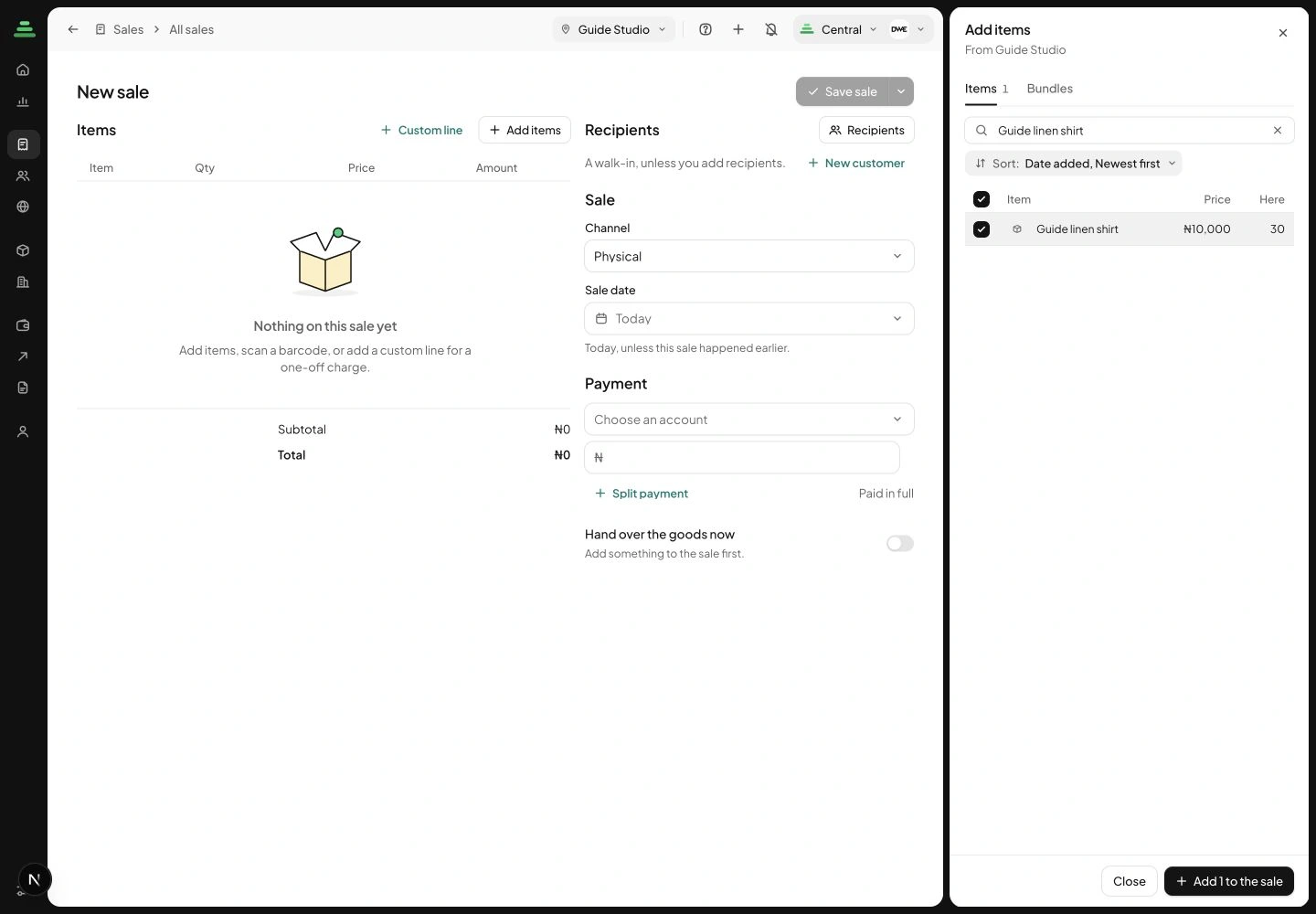
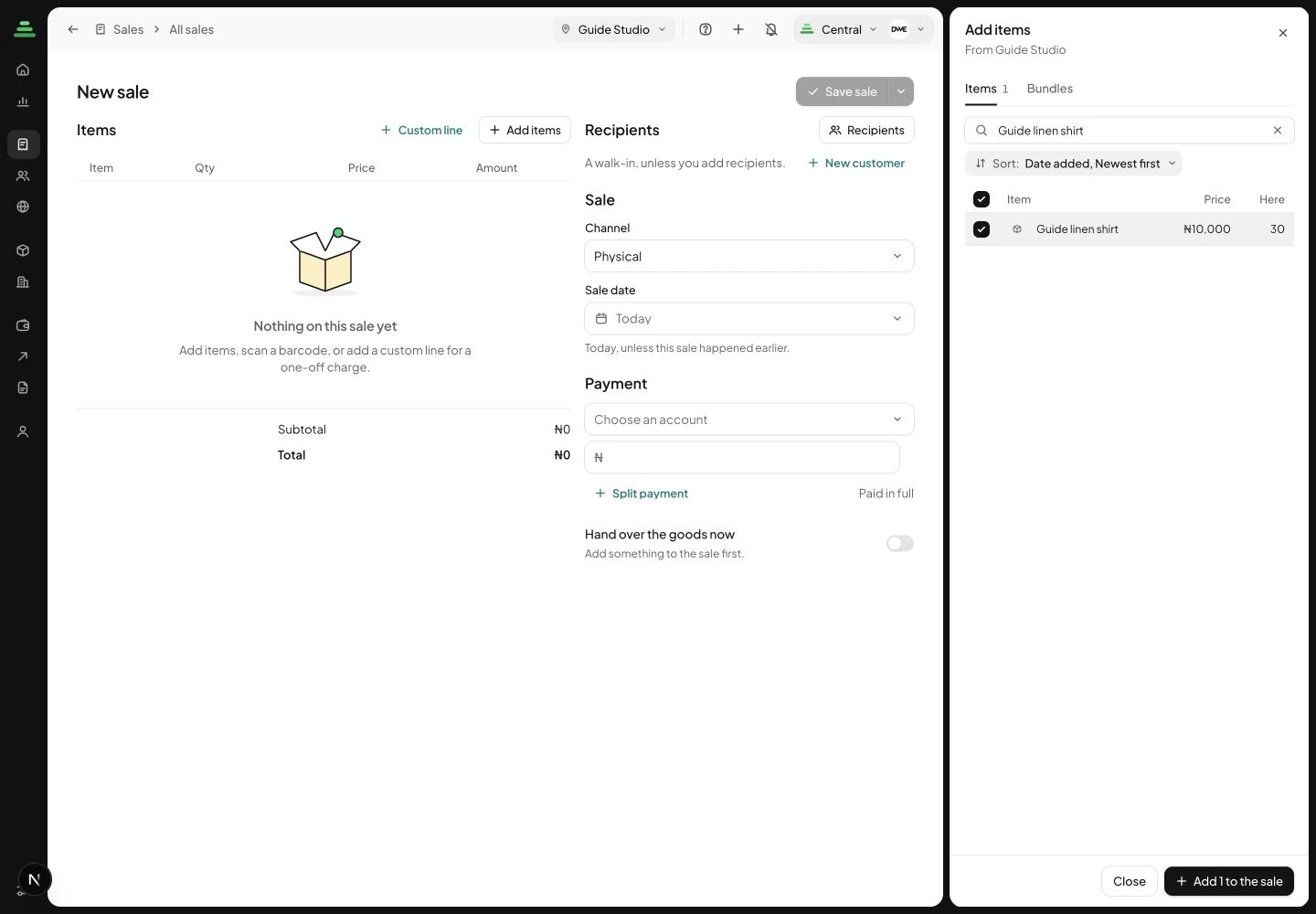
Open All sales and choose New sale(s). Use Add items, search for the product and check its location. Tick the row and add it to the sale. Set the correct quantity, then check the total before saving. A custom line is available for a genuine one-off charge, but an existing stock item should be selected accurately so its later stock activity stays connected.
 Enlarge screenshot
The Add items picker for the example sale at Guide Studio. Check the result: The sale contains the intended product and quantity.
2. Use the saved sale as the order reference
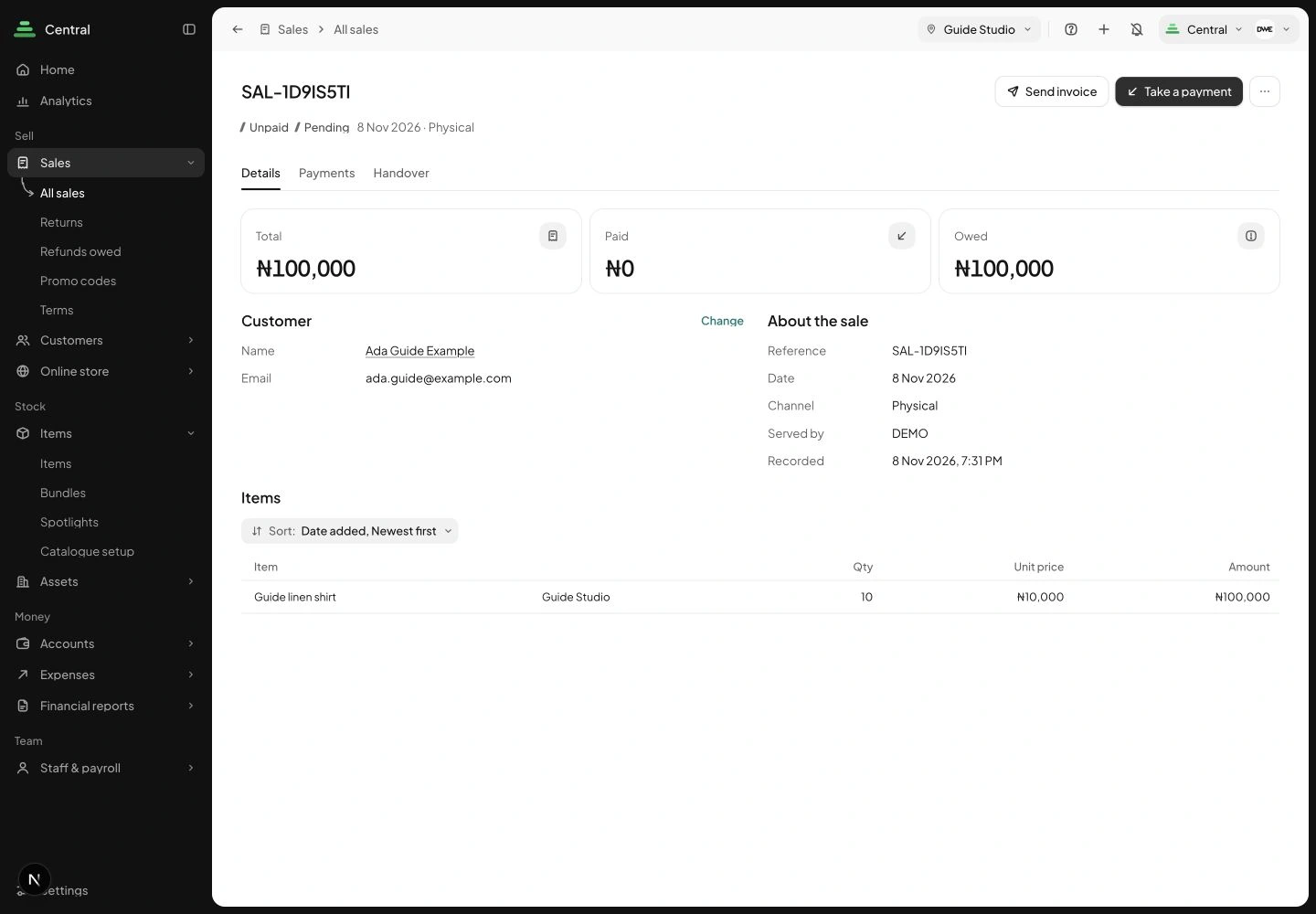
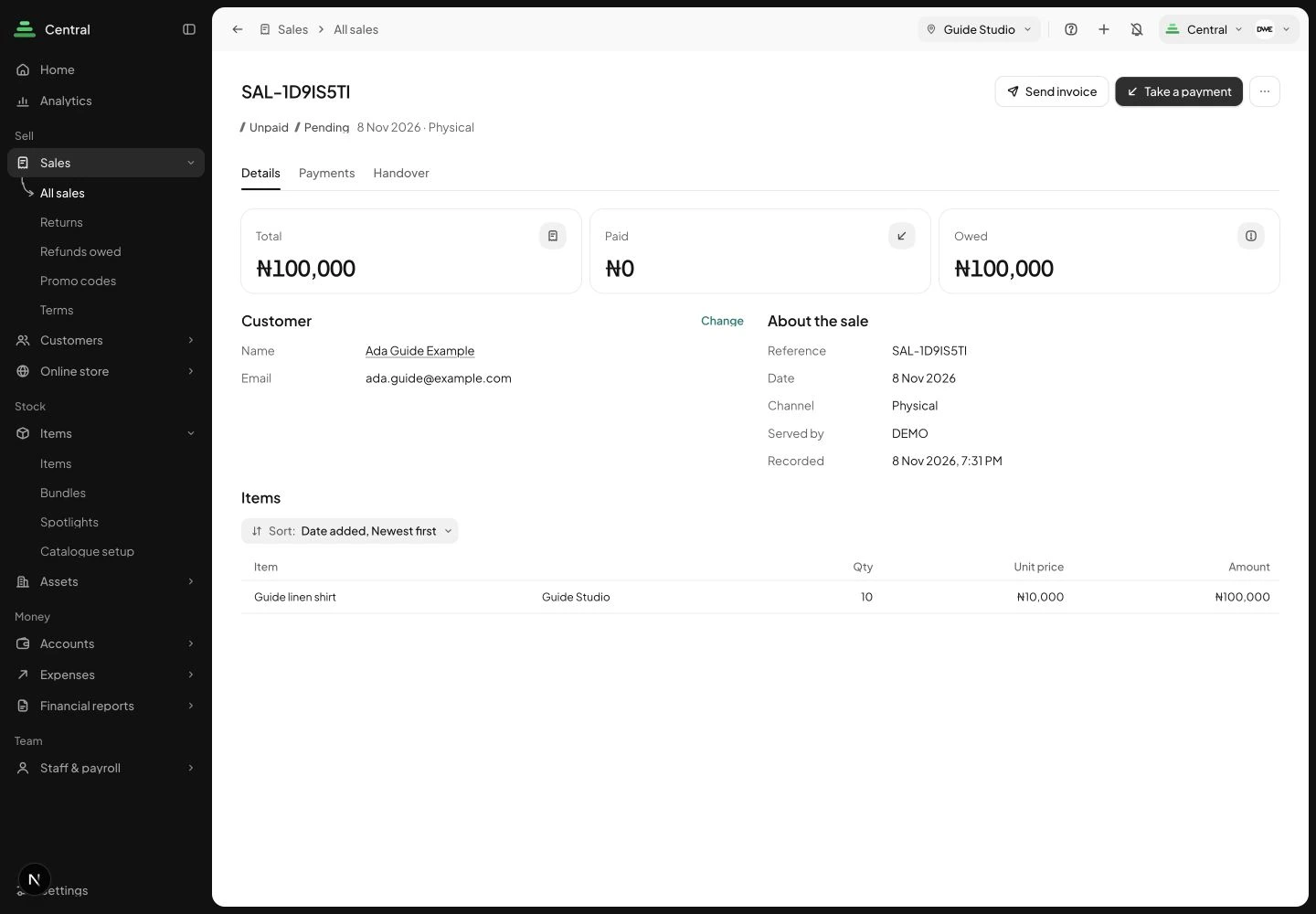
Save the sale, then open its Details. Check the reference, customer, item quantity, total, paid amount and owed amount. The form requires initial payments to add up to the total, or be left empty to save unpaid. For this example we saved it unpaid, then recorded a confirmed part payment from the saved sale.
 Enlarge screenshot
The saved sale has a reference and an explicit payment balance. Check the result: You have one saved record to use when following up the order.
3. Record a confirmed payment from the sale
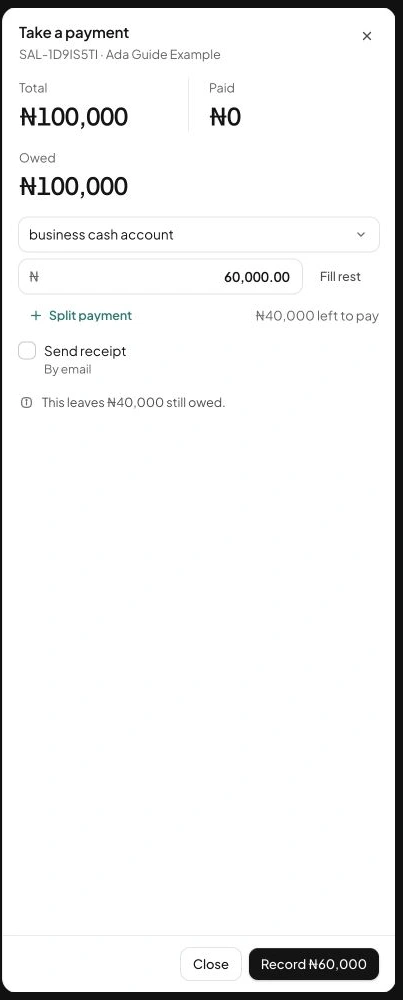
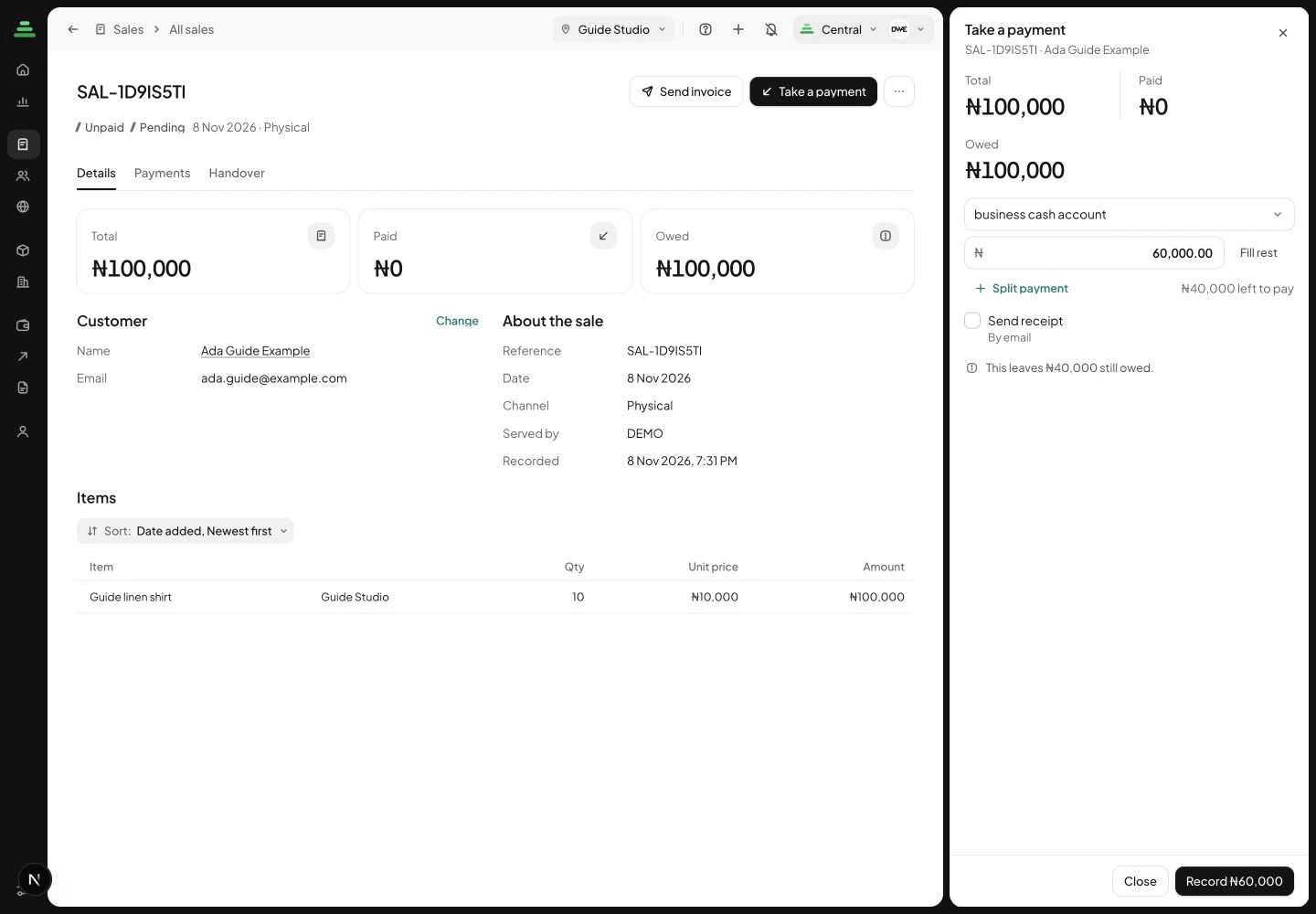
Choose Take a payment. Select the account that actually received the money and enter the amount received. Our sample payment is ₦60,000 against a ₦100,000 sale, leaving ₦40,000. Review whether a receipt should be sent before confirming. Never enter an amount merely because the customer sent a transfer screenshot.
 Enlarge screenshot
The payment panel shows the amount being recorded and what will remain owed. Check the result: The recorded payment reflects money you have independently confirmed.
4. Check the updated balance
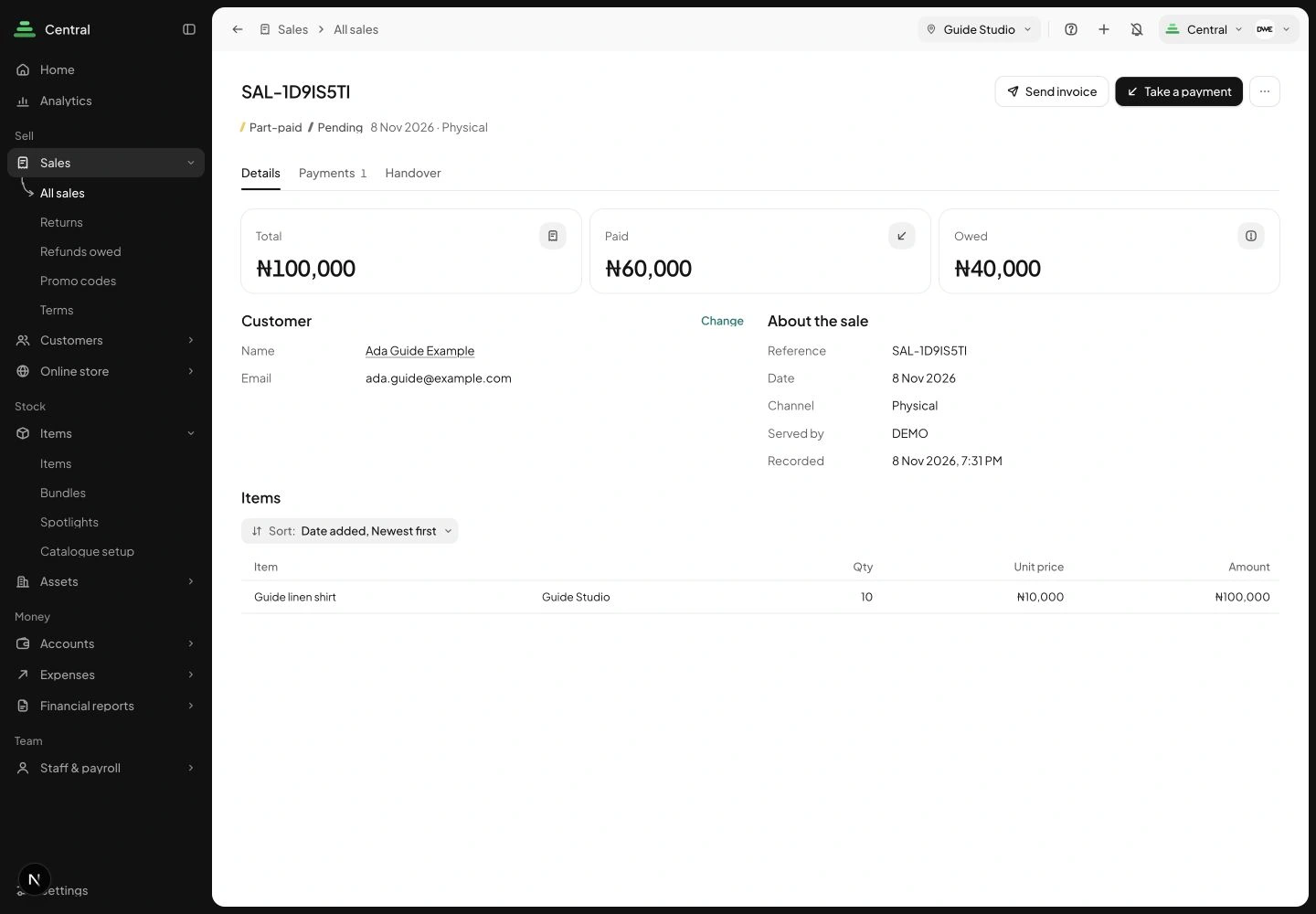
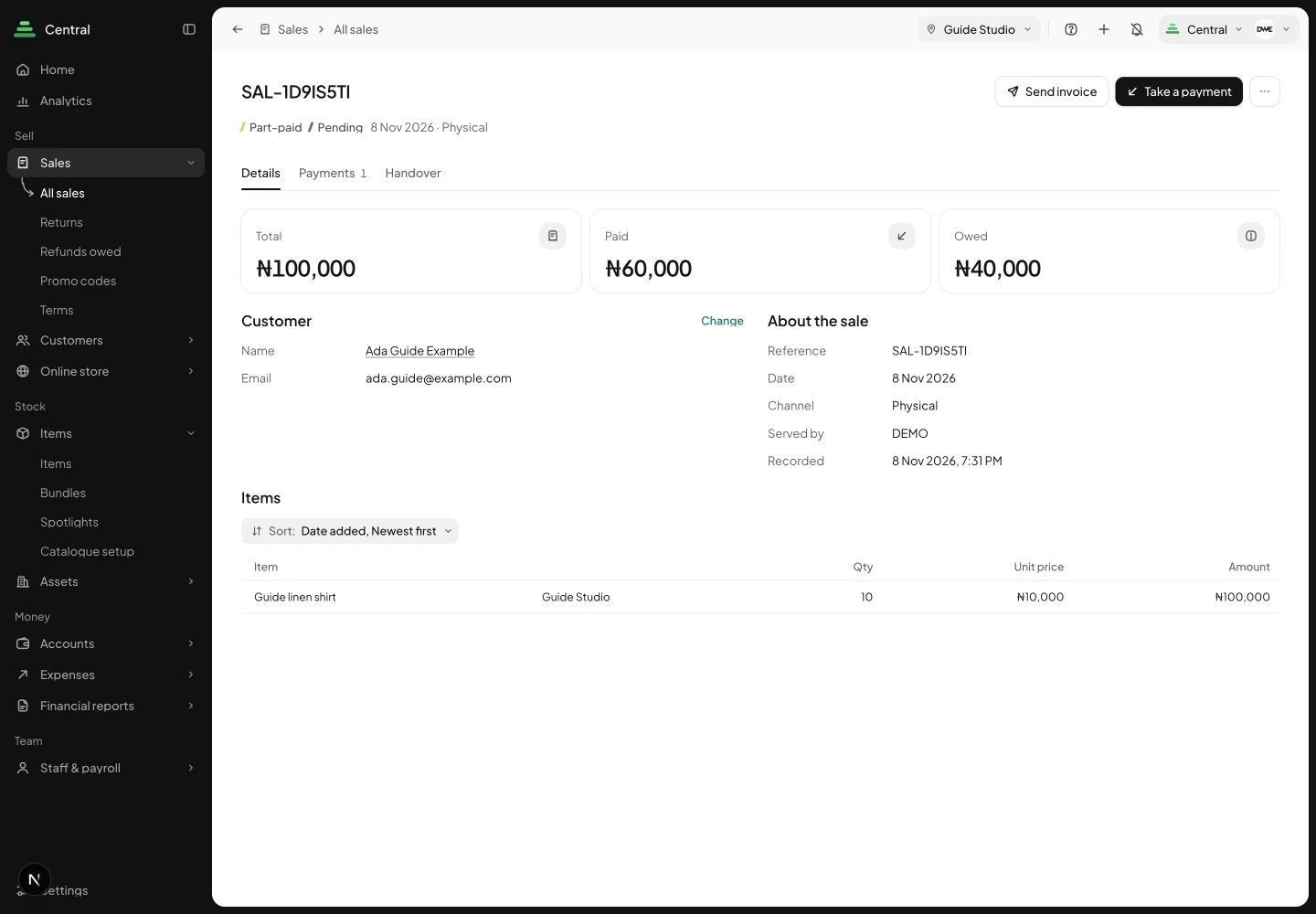
Return to the sale after recording the payment. Stohb shows Total ₦100,000, Paid ₦60,000 and Owed ₦40,000 for this stage of our example. Use the Payments tab to review recorded payments. Payment progress is visible here; it does not mean the goods have already been handed over.
 Enlarge screenshot
The saved example becomes part-paid with a ₦40,000 outstanding balance. Check the result: You can see exactly what is paid and what still needs follow-up.
5. Track preparation separately from payment
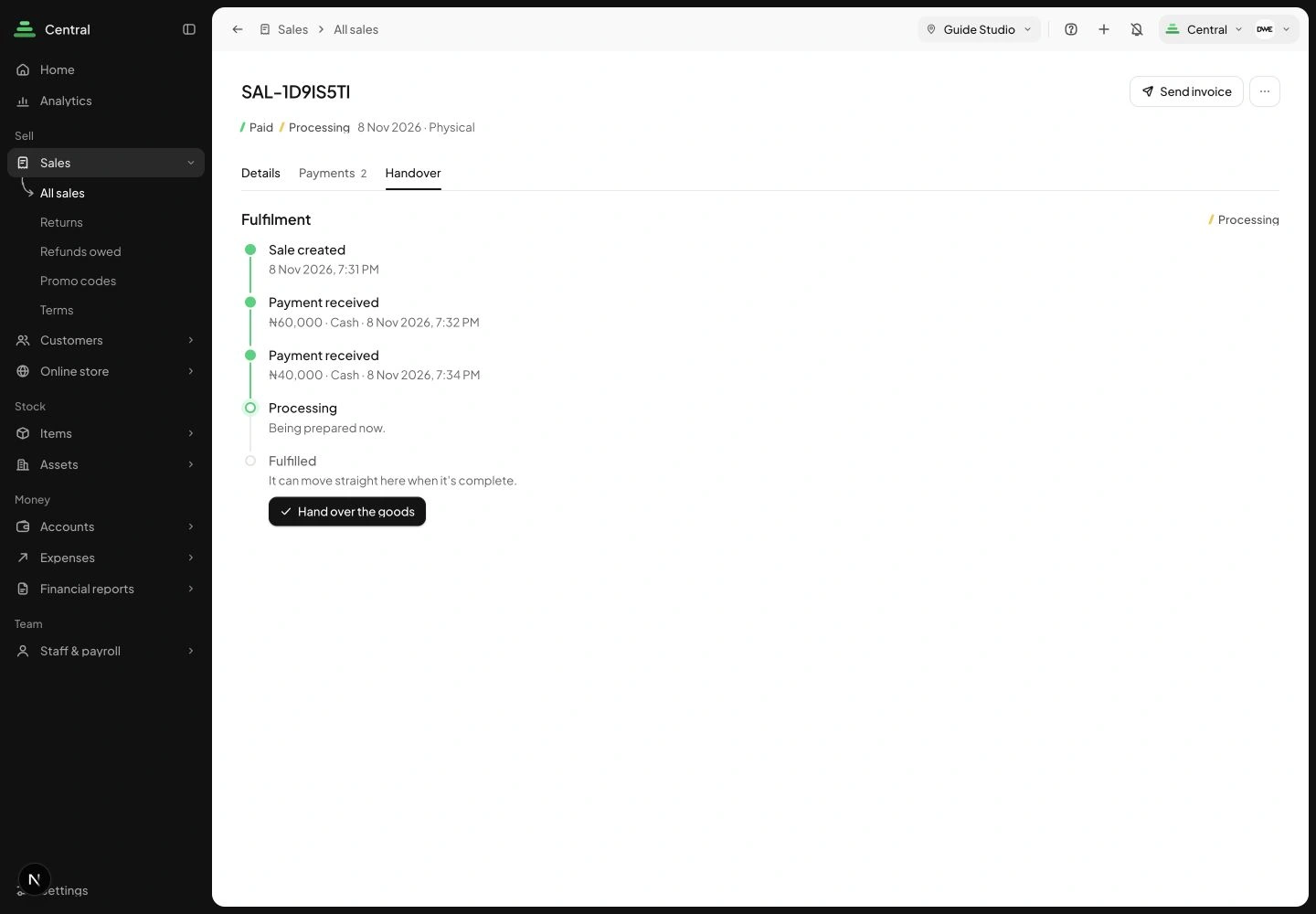
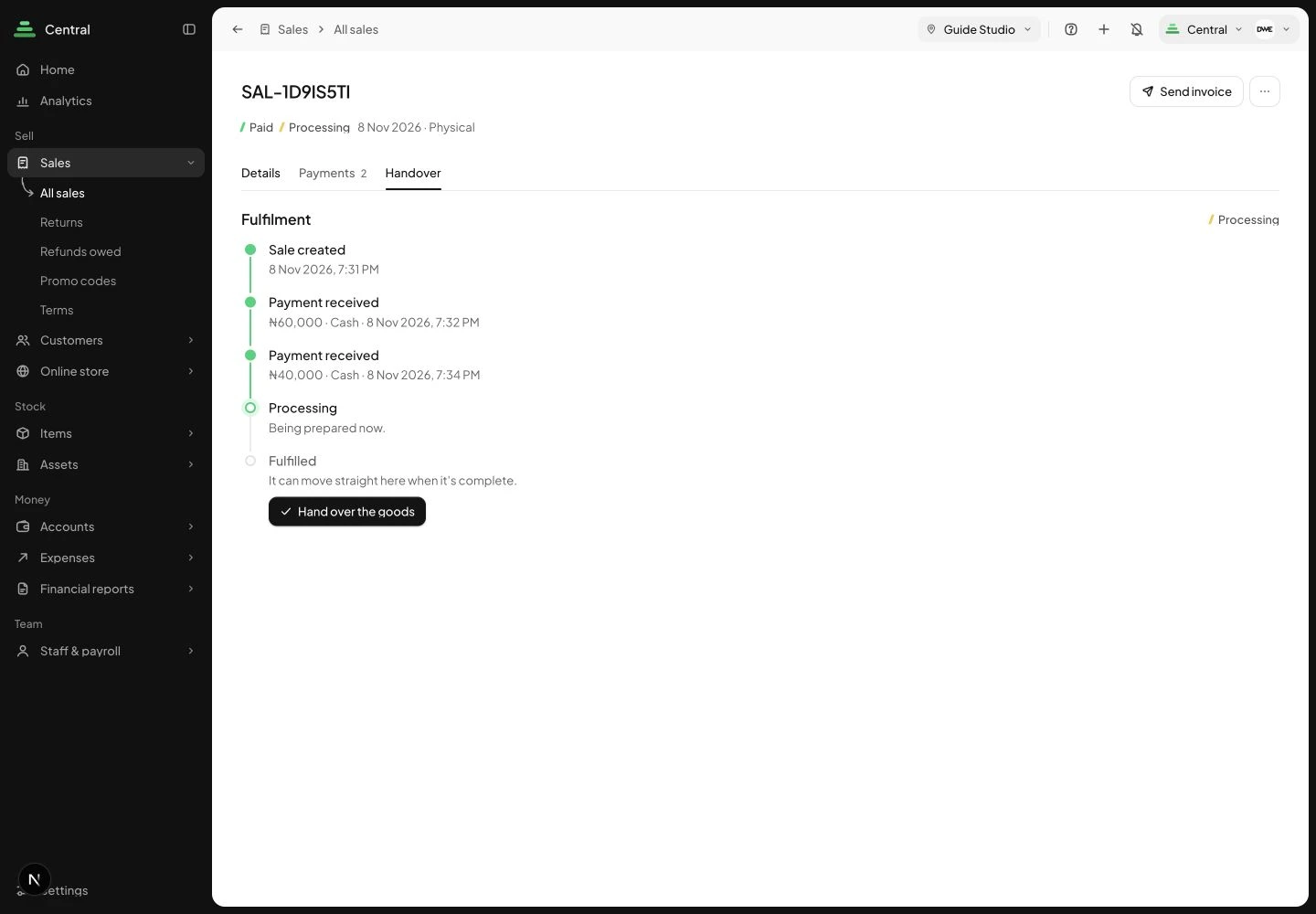
Open Handover. Use Mark processing when preparation begins. In this example, Hand over the goods becomes available after full payment. We then recorded the remaining ₦40,000 and completed handover. Stohb confirmed that stock and cost were recorded. Keep any courier reference or delivery confirmation your process needs; handing goods over is not automatic proof that a courier has delivered them.
 Enlarge screenshot
Handover shows the example payment history and the action to release goods. Check the result: You understand the preparation state, the payment requirement and when stock is released.
Understand the decisions behind the steps
The app keeps the record useful. These explanations help you decide what to enter and how to interpret what Stohb shows.
Give each order one reliable reference
A chat, a transfer and a parcel can all describe the same order. Without a shared reference, someone must reconstruct that connection later. Use one order reference and keep it with the sales record and fulfilment information.
Confirm the actual item, variant, quantity and agreed charges. A request for a ‘black shirt’ is incomplete if several designs and sizes exist. Record enough information that another person can pick the correct product without reading the entire conversation.
Separate payment from fulfilment
Payment describes money received and still owed. Fulfilment describes the work needed to get the order to the customer. A fully paid order can still be waiting to be packed. A packed parcel can still be waiting for dispatch.
Use the status labels actually available in your app, and supplement them with a consistent checklist where needed. Do not assume one label answers both questions. The useful operational question is: ‘What is the next action, and who is responsible for it?’
Check payment against the correct order
Confirm payment through your own receiving account or approved payment system. Match the amount and relevant reference before updating the order. A screenshot sent by a customer is not the same as confirming receipt yourself.
In a fictional order worth ₦25,000, a confirmed ₦15,000 payment leaves ₦10,000 outstanding. Keep that distinction visible. Avoid recording the transfer twice because two members of staff saw it, or marking a different customer’s order paid because the amounts happen to match.
Prepare a clear picking and packing process
Work from the confirmed order, not memory. Check the item, size or colour, quantity and condition before sealing the parcel. Confirm the address, phone details and any delivery instructions needed by your chosen carrier.
Keep personal delivery information accessible only to the people who need it for the job. If you demonstrate the process in a public screenshot, use fictional details. A useful picking list shows the order reference and contents without exposing more customer information than necessary.
Record dispatch and explain delays
Keep a dispatch reference or other appropriate evidence of handover. Recording dispatch does not automatically prove delivery. Where your process relies on manual carrier follow-up, describe it honestly rather than promising live tracking that is not available.
If a delay occurs, explain what is known, the revised expectation and when the customer will hear from you again. For example: ‘Your order AD-104 is packed. Collection has moved to tomorrow. We will update you after handover.’ Only give a timing you have a basis for believing.
Review unfinished orders every day
Review orders needing details, payment checks, picking or dispatch. Give each exception a next action and an owner. A list of unpaid amounts is useful for payment follow-up, while a list of paid but unfulfilled orders helps the packing team.
Use Central’s sales records to keep the commercial details together. Inspect current controls before deciding how your team will organise its working list. At day’s end, match parcels prepared with the orders they belong to and carry unresolved differences into a short exception list.
Before you move on
- Keep one reference from order confirmation to dispatch.
- Track money and fulfilment separately.
- Check the exact variant before packing.
- Give every unfinished order a next action.
A few useful answers
Does paid mean delivered?
No. Payment and fulfilment describe separate progress. Check both before treating an order as complete.
What if the address changes?
Confirm the change, update the appropriate order information and make sure the packing or dispatch team is using the latest details.